Recently we worked on a simple Open edX plugin: when a user registers an account, the plugin must automatically create an organisation and give that user staff privileges for it. This is for testing/demo purposes.
There was a problem we found tricky to overcome: user registration and the associated signal (STUDENT_REGISTRATION_COMPLETED) happens on the LMS, but the CourseCreator model is only installed and available on the CMS.
We considered a few approaches and thought our findings may be interesting to the community, especially where it relates to usability of the event bus and celery queues:
Patching openedx-platform
An option was to submit a patch to openedx-platform to make CourseCreator available on the LMS. We considered it, but this would mean adding a CMS app to the list of LMS installed Django apps, which was not preferable.
Consuming the signal on the CMS via the event bus
There is a relatively new message bus system as part of openedx-events, which should provide support for directly consuming this signal from the CMS, even though the signal was sent from the LMS. However this turned out to be rather complex with the current tooling:
- The message bus system requires a separate server process running (the
consume_eventsmanagement command). This is not configured in Tutor deployments as far as we know (the event bus is deployed, but no consumers), so would require a Tutor plugin, and running extra pods with this event consumer. Note that this is separate to the celery lms/cms workers, and separate to the usual lms/cms backend processes. - The signal needs to be added to the
EVENT_BUS_PRODUCER_CONFIGsetting, for it be published to the event bus (otherwise the signal will remain local to the app). There isn’t a neat way to add to this for a deployment with Tutor yet - you can override theEVENT_BUS_PRODUCER_CONFIGin the lms-env or cms-env patches, which loses pre-existing config, but not add a new entry to it.
We experimented with a proof of concept on a Tutor dev devstack, and got it working with the following set up:
- A plugin installed on the CMS
- that registers a receiver for the
STUDENT_REGISTRATION_COMPLETEDsignal.
- that registers a receiver for the
- The following Tutor plugin to ensure the signal would be sent to the event bus:
hooks.Filters.ENV_PATCHES.add_item( ( "lms-env", """ EVENT_BUS_PRODUCER_CONFIG: org.openedx.learning.student.registration.completed.v1: user-lifecycle: enabled: true event_key_field: user.id """ ) ) - Manually running the consumer in the cms container:
python manage.py cms consume_events -t user-lifecycle -g arbitrarygroup --extra '{"consumer_name": "c1"}'.- Note that you would need to be careful to only run a consumer for the related topic (“user-lifecycle” here) on the CMS; running it on the LMS or on both would result in errors, because this code fails if run on the LMS.
- It appears there is great flexibility for site operators to run consumers how they wish, which also makes them more complex and more specialised than the Celery workers.
For reference, a diagram of what this structure looks like:
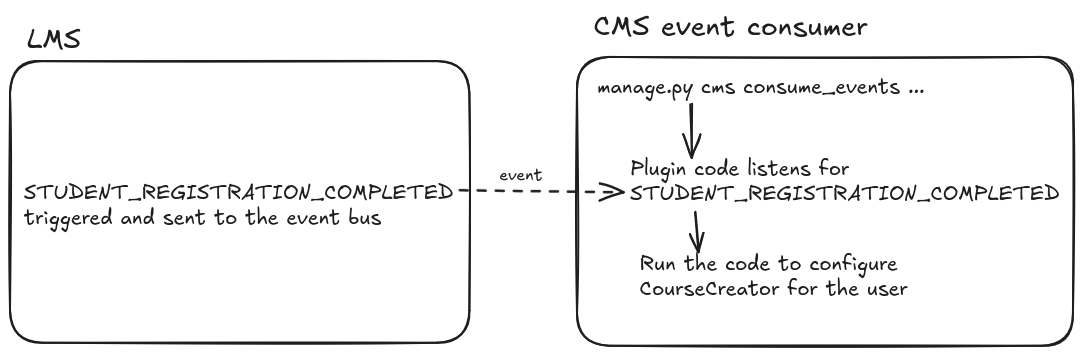
However we abandoned this approach due to the effort required to set this up cleanly in production.
Celery antics
For the final approach we settled on, we took advantage of per-app Celery queues.
In this method, we install two separate entrypoints of the plugin: one in the LMS and one in the CMS:
- In the CMS: register a Celery task that takes a user id, and configures the desired organisation and permissions for the user
- In the LMS: listen for the
STUDENT_REGISTRATION_COMPLETEDsignal, and schedule a Celery task on the edx.cms.core.high queue.
A diagram of how this looks:

The caveat is that it’s trickier to test on a Tutor dev devstack, because it doesn’t configure Celery workers in dev mode. We needed to turn off CELERY_ALWAYS_EAGER and add Celery worker containers. See the example Tutor plugin for how this works.
This works out of the box on a production environment though. 
The result can be browsed at opencraft / dev / openedx-auto-studio · GitLab