Enabling/Disabling Feature Flags
This is documented with an example but I don’t think the example covers enough use cases or describes how to trace a feature that you want to enable through tutor. I documented my case here, but I struggled with: a) what is the right patch name (openedx-lms-common-settings & openedx-cms-common-settings) and b) when to use FEATURE as in this example vs not as in this example.
Enable a plugin
Take forum for example. The majority of new users I think want to enable this, but I can’t see it mentioned in the official tutor docs, only in old support responses. Very common use case and very easy win (“I turned something important on!”) for a new user.
Switch the Theme
I almost never switch the theme and it is documented, but I tried to test it just now by.
- Copying indigo theme directory to indigo2.
- Making a test change in the footer.index
<span class="copyright-site">Copyrights ©${datetime.now().year}. All Rights Reserved EDIT.</span>
<span class="copyright-site">Copyrights ©${datetime.now().year}. All Rights Reserved EDIT2.</span>
- Rebuild the openedx Docker image and use settheme to switch themes:
tutor images build openedx
tutor local do settheme indigo2
In the django admin, now indigo2 is the set theme, but my changes don’t seem reflected:

Enable Python and Javascript Xblocks
Every new Open edX install going back some time leads to this unpleasant error:
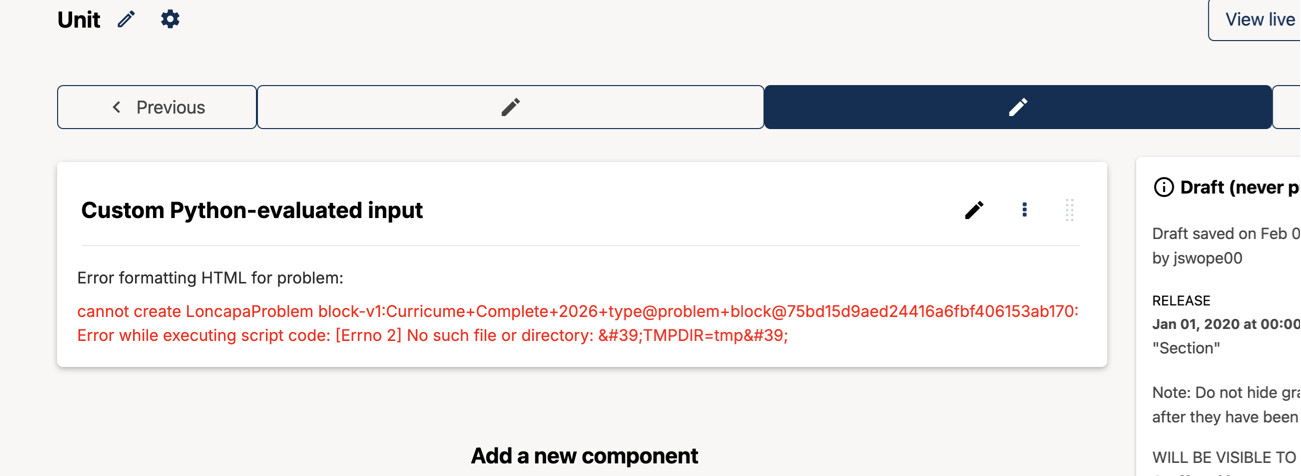
I know this is brought up in many discussion forums, but I’m still unclear if it is totally unavailable when installing via Tutor or if there is an approach to fixing. This should be clear from Tutor docs.
- Codejail cannot run without a user set · Issue #162 · openedx/codejail · GitHub
- ("[Errno 2] No such file or directory: 'TMPDIR=tmp'", ) - #6 by Jonathan
- [Errno 2] No such file or directory: 'TMPDIR=tmp'
(In that last discuss post, seems like there is a best-practice solution for this. )