Newbie here to the community. I am in the very early phases of building out an online education platform for consumer use and as part of the initial work, I’ve had a sandbox instance created for me of OpenEdX to try and create a proof of concept course module.
What I’m trying to create is a basic pilot module in Studio where learners:
Watch a video lesson
Complete an interactive VectorDraw exercise by drawing a trendline on a chart
Immediately see either:
A “Validation” video if correct, or
“Try Again” video if incorrect
I’ve tried two different ways to create this. One using Conditional XBlock and another using Flow Control.
In the conditional block set-up I have:
Two Conditional blocks:
One set to correct = True → shows “Validation” video
One set to correct = False → shows “Try Again” video
Source component ID from our VectorDraw problem was pasted into each Conditional
The problem: Both videos often show as “blocked” even after the exercise is submitted and scored correctly. Sometimes neither video shows. We suspect Conditional isn’t reading the correct attribute as expected from VectorDraw.
In the Flow Control XBlock I have:
Unit 1: VectorDraw exercise
Unit 2: Flow Control for = 100% → goes to Validation Video
Unit 3: Flow Control for < 100% → goes to Try Again Video
Unit 4: Optional loop back to retry
The problem:
Redirection is not triggering and all units are showing in the navigation
I’m unsure whether to use block ID, unit URL, or something else in the Flow Control config
If anyone is able to shed any light or help point me in the right direction, I’d be hugely grateful.
Hi @Michaelmc and welcome to the community! I updated the title of the post to also indicate the problems you’re experiencing with the specific Conditional & Flow Control XBlocks, hopefully that will get the right eyes on it
Thanks for the flag @sarina I hadn’t seen this. Hello @Michaelmc , I haven’t used the vectordraw x-block specifically but your hunch sounds correct. The conditional block is mainly tested with core question types. I’ll aim to try this out today and see what I find. Will revert back by evening…
OK so looks like the VectorDraw block is deprecated and I don’t have access to an older Open edX instance where I could test it directly.
So I can only provide some steps to help your debugging.
As you’ve surmised, the conditional x-block is checking the correctness of another problem.
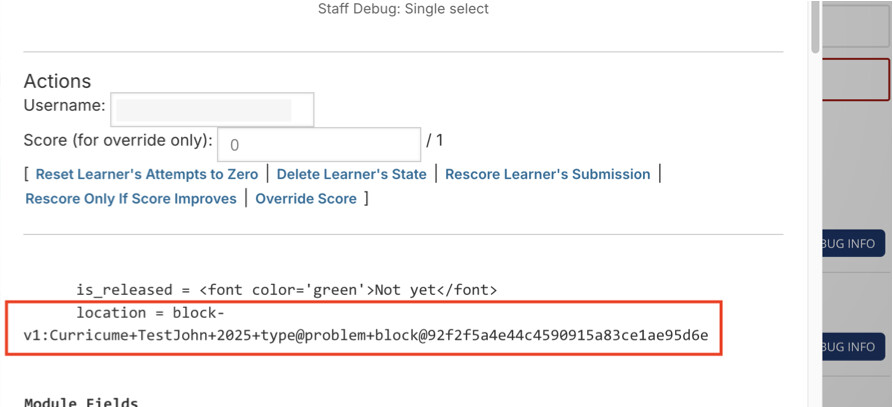
So a possible culprit is a misformed location string. Location strings can be gotten from the staff Debug Info:
And then here:
Looks like this in the conditional:
If you’ve got that right, then the more likely culprit is that the VectorDraw x-block doesn’t store correctness in the way that Open edX expects.
It seems like Open edX looks for “correctness” in the Score History data for a problem. So if you check the Score history for a user then the “correctness” key needs to exist with a “correct” value. Like it does for a standard Multiple Choice problem:
If it shows a different value or doesn’t show at all, then conditional won’t work.
Hi John, thank you so much for taking the time to review this. We are about to start Discovery Phase with OpenCraft on the build of the project, so I will be including this into the discussions with them.
I sent you a connection invitation on LinkedIn as well and would love to talk through with you our plans for our platform and see if we could learn from your experience and expertise in course design.