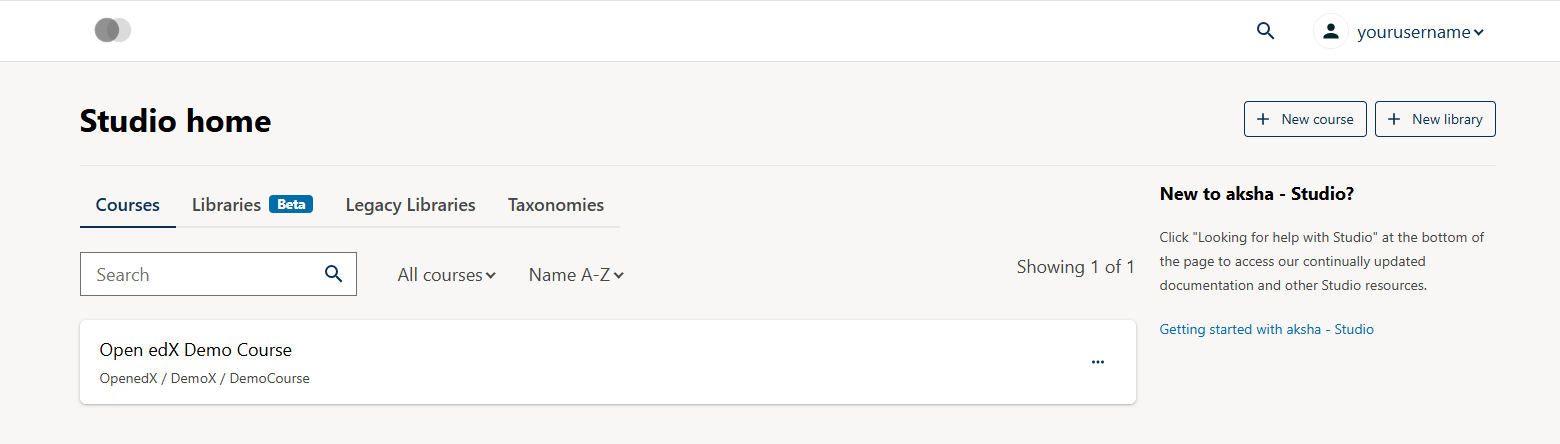
Superuser Login not working . Student login is working fine

am getting We couldn’t sign you in. An error has occurred. Try refreshing the page, or check your internet connection.

superuser is there

Able to view login page with URL http://studio.local.openedx.io:18010/

Below studio is there in config.yml

SERVICES:

studio:

ENABLE: true

Hi @karthik
How did you create your superuser? did you follow the instructions here? Creating a new user with staff and admin rights

tutor local do createuser --staff --superuser yourusername user@email.com

Hi @joel.edwards ,

Thank you so much for the reply

yes I have created with this command tutor local do createuser --staff --superuser yourusername user@email.com and followed below approach also

from django.contrib.auth import get_user_model
from django.utils import timezone

User = get_user_model()
u = User.objects.get(username=‘admin’)
u.email = “KARTHIK@GMAIL.COM”
u.is_staff = True
u.is_superuser = True
u.last_login = timezone.now()
u.set_password(“A123!”)
u.save()
exit()

Now am able to login but I didn’t see option to add cources

mysql> SELECT id, username, email, is_active,is_superuser FROM auth_user WHERE email=‘user@email.com’;
±—±-------------±---------------±----------±-------------+
| id | username | email | is_active | is_superuser |
±—±-------------±---------------±----------±-------------+
| 7 | yourusername | user@email.com | 1 | 1 |
±—±-------------±---------------±----------±-------------+
1 row in set (0.00 sec)

@karthik It’s a bit unclear what you are trying to communicate in the last post. I am guessing, you are able to verify that the user is acive and superuser in MySQL. That’s great.

Now, if you go to the Studio URL and successfully login, you should be redirected to the Studio homepage which will have a URL liek http://apps.<your-lms-domain>/authoring/home, which should have an [+ Add Course] button.

Are you not redirected to that URL? Are you not seeing the “Add Course” buttton?

If this is your first time working with Open edX, I would recommend going throught the Educator documentation to familirise yourself.

Hello @arunmozhi ,

Thank you and apologies of the late reply.

Yes am working first time . LMS - http://local.openedx.io/ am able to login with student user and CMS Studio - http://studio.local.openedx.io am able to login but not seeing [+ Add Course] button.

Can you please guide me for initial setup of superuser login to add cources

Hi @karthik
Would you mind posting a screenshot of what the studio interface looks like for you? I think that might help us better understand what you are seeing.
Ordinarily the + New course button should appear in the upper-right portion of the window.

I wonder if perhaps you might need a rebuild of the images if something didn’t load correctly, maybe worth trying that as well: tutor images build openedx mfe --no-cache && tutor local stop && tutor local start -d

@joel.edwards Showing … Sorry, new users can not upload images.

Sorry about that, I’ve increased your user trust level, so you should be able to upload images now, mind trying again?

1 Like

@joel.edwards One is CMS login screen and other is LMS student login ..We are trying to build a Aksha Learning LMS …

based on that screenshot, it looks to me like you are in the learner dashboard and not the studio, so that’s why you’re not seeing the option to add a course. is it the same screen when you go to studio.local.openedx.io ?

@joel.edwards Yes with this URL http://studio.local.openedx.io/ with super user am seeing almost same screen and not seeing Add Courses Option

Ah! That looks like something got messed up in the setup and and the studio doesn’t have the right OAuth credentials for communicating with the LMS. Try running

tutor dev do init

or

tutor local do init

depending on whatever you used to run the launch command. That should ideally fix that issue and redirect studio.local.openedx.ioapps.local.openedx.io/authoring/home/ where you should have the options to work with courses.

2 Likes

Thank you @arunmozhi

1 Like